I’ve written dozens of blog posts about Postgres internals. Postgres is one of the greatest databases out there. But from chatting with a lot of my friends at startups, I’ve seen consistent challenges. Two weeks ago I started rebuilding it from scratch in Rust with AI and now I have 250k lines of code, a third of Postgres’s regression tests passing, and a WASM demo you can try at pgrust.com.
Postgres is one of the greatest databases out there. It’s great all around and it’s become the default for any startup to use. But while Postgres got a lot of things right, I believe there’s opportunity to do even better.
From chatting with a lot of my friends at startups, I’ve seen consistent challenges with using Postgres. There’s over 350 settings, and if you configure one wrong, the vacuum can take down your whole database. You need a connection pooler, or else a storm of connections can bring down your whole database. And don’t get me started on how Postgres doesn’t capture statistics on JSONB.
And that’s only scratching the surface when it comes to challenges with running Postgres.
I spent years dealing with these problems. At Heap, I spent years running a Postgres cluster with over a petabyte of data in it. I have written dozens of blog posts about Postgres and the Postgres internals. I know the ins and outs super well, and I know it’s possible to do even better.
That’s why two weeks ago I started working on pgrust. pgrust is a rebuild of Postgres in Rust. The result so far is pgrust. 250,000 lines of Rust. That includes all the major Postgres subsystems. It looks exactly like Postgres and currently passes one third of Postgres’s 50,000 regression tests (there’s quite a long tail of functionality when it comes to Postgres).
I compiled pgrust to wasm so you can try it out in your browser right now. It’s preloaded with a number of examples to show off what pgrust is capable of (one that implements a Lisp interpreter.
I don’t think this project would have been possible two years ago, let alone even six months ago. Coding agents, mainly Codex, have been a massive accelerant for this project, and I wouldn’t have been able to make anywhere near as much progress as I have without them.
Before I walk you through the whirlwind that’s been the last two weeks, let me show you why databases are one of the most complicated pieces of software out there.
What’s in a Database?
Postgres has been in development for nearly 40 years and consists of around 1M lines of C code. Just to give you a sense of some of what makes up those 1M lines:
- Multiple programming language implementations in SQL and PL/pgSQL
- An advanced concurrency system that enables multiple queries to manipulate the same data simultaneously
- A durability system that guarantees no data loss, even if the power crashes in the middle of an operation
- Over 100 different built-in types including regular expressions, JSON, geometry types, and much more
And that’s only scratching the surface. If you’re curious to learn more, I’ve written dozens of posts about Postgres internals.
Given the scale of Postgres, how did I built anything remotely close to Postgres on the scale of two weeks? The answer – I got a lot of help with AI.
To give you a sense of how fast things have been moving, here’s how the number of lines of code have changed each day:
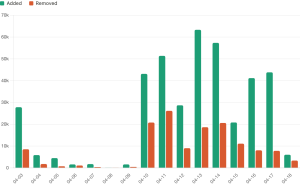
Let me walk you through day by day how I went about building pgrust.
Day 1 – The Foundation
The first decision I had to make was how to approach the rewrite. From the beginning, I wanted something runnable at all times. If I tried to rewrite all of Postgres at once, I knew I’d end up with a mess that didn’t work. I considered two options:
- Integrate Rust into the existing Postgres codebase and replace each Postgres component one at a time
- Start completely from scratch and build my own version of each component
After looking at how tightly coupled Postgres’s components are, I thought option 1 would be really hard to even get started with. I decided to go with option 2. I could skip figuring out how to integrate Rust into the existing C codebase and could get something running much sooner.
My goal for day 1 was to get something that could run queries. That way I would have something I could compare directly against Postgres. That meant I needed four things:
- A storage layer
- A SQL parser
- Concurrency controls
- A query executor
Although I never actually looked at the code for these, with my experience in Postgres, I had a pretty good understanding of how they worked. My workflow was straightforward. I’d point Codex at the Postgres source code and ask it to explain to me how each component worked. From there, I would work with Codex and build a minimal version of that component in Rust.
Within a little over three hours, I had something that could run real SQL queries. I got something working much faster than I’d expected.
By the end of the day, I was able to support a lot of the fundamental Postgres features:
- CREATE TABLE/DROP TABLE
- SELECT/INSERT/UPDATE/DELETE
- JOIN/WHERE/ORDER BY/LIMIT
- BEGIN/COMMIT/ROLLBACK
I was really happy with my progress.
As an aside, throughout this I was using Codex 5.4 fast. I prefer using Codex over Claude because it’s just way faster, especially with the fast option. I tried using the Claude Code Fast mode but would consistently hit rate limits.
Days 2-7: Performance and Debugging
Now that I had a system that could run queries, it was time to experiment. One question I had going into this project was whether or not it was possible for pgrust to be faster than Postgres? Two experiments in particular showed great results.
Multi-threading: I’ll spare you the details, but there are two different ways to parallelize a program. You can use multiple processes and you can use multiple threads. In general, processes are easier to work with, but threads are faster.
Postgres uses processes largely for historical reasons. There’s been chatter about switching to a thread-based model for years, but nothing concrete has materialized. It’s just really hard because changing to a thread-based model would require refactoring pretty much all of Postgres.
Starting from the ground up in Rust changes the equation. I can start from the beginning with a thread-based model. In an overly simplified benchmark, I was able to get individual queries to be 3x faster when using threads on a small in-memory dataset. Largely because Postgres will only parallelize a query when there’s a certain amount of scale involved, because processes are so expensive to spin up.
Regular expressions: I know from experience that Postgres’ regular expression engine is slow. It predates modern regular expression syntax and has not had as much effort put into it as other regular expression engines.
On the other hand, the Rust regular expression engine has had a ton of effort put into it. It will use things like SIMD to speed up the query.
On some simple benchmarks, I found the Rust regular expression engine to be 10x faster than the Postgres one, showing that there’s still a lot of room to improve on Postgres.
A couple of important notes. Both of these optimizations were in very specific contexts. My goal was more to show that there is opportunity to improve on Postgres than to show that there is a way to improve all queries in Postgres.
Also, the current version of pgrust has a lot of unoptimized code. Since I did the original benchmarking, I’ve added some components, such as the query planner, that I have not optimized yet. The numbers above reflect an earlier version of pgrust, and benchmarks on the latest version may not yield the same result.
Debugging: besides doing experiments, the other part of my time was spent on fixing bugs. The concurrency management system and the storage layer for Postgres are two of the trickiest pieces to get right. Even though I had rust, there were still some concurrency issues that I had to debug.
One issue I had was a race condition that would, in some cases, an extra row would appear and in other cases a row would never appear. It turns out I had a race condition where data could be updated in memory after it was written to disk. That means some operations would just never make their way to disk, and it would be as if they never happened.
When debugging these issues my process would look like the following:
- Ask Codex if it could figure out what the issue was. If so, I would ask it to write a minimal repro for the issue
- If Codex could not figure out, I would keep running the test until I could repro the issue and try to get the issue to repro more consistently. Once I could consistently repro the issue it was usually easier to figure out what was happening.
Days 8-14: Going Multi-Agent
After I had demonstrated there were opportunities to make Postgres faster, I switched back to focusing on covering more of the Postgres surface area. I discovered Postgres has a regression suite of 50,000 SQL queries. My goal became to get as many of these queries to pass as possible.
Immediately, the gaps I saw were related to a number of “large features” that Postgres has. These include things like PL/pgSQL, json, and a vast number of math-related functions.
With Codex, I was able to knock out large chunks of these features in one shot. Often, Codex could get 50% of the tests for a particular feature passing in one go. That’s a big part of what contributed to the spike on April 10th.
But as I started to knock out these large features, things started to slow down. That’s when I realized that the size of a feature has little to do with how hard it is for an AI to build the feature. Often a small feature that requires changing the existing codebase is much harder than a large, net new feature.
For example, one “small feature” I worked on was adding the ability to put comments on tables. Even though it’s a pretty small feature, it took Codex more time than it took to add the majority of JSON support.
As I was doing more and more of these tiny features, things started to slow down, and you see my velocity dropped on April 12.
At the same time, something was bothering me. Often, when I was building a new feature, I would ask Codex to build it, and it would spend 5 minutes and then come back with a working version of the feature. During those five minutes, I wasn’t doing anything except for waiting.
That’s when I decided to try going multi-agent.
Going multi-agent: I avoided going multi-agent before because I thought it would be too hard to coordinate work across multiple agents. But now that I had laid a lot of the Postgres foundation, a lot of what I needed to build were disjoint features. JSON support was independent from PL/pgSQL, and it seemed like it would be pretty easy to work on them at the same time independently.
On April 13th, I downloaded Conductor. Those that don’t know, Conductor is a tool for running and coordinating multiple agents at a time. It automatically handles git worktrees so that your agents can work on the same codebase independently of each other.
I spun up multiple agents and had one focused on building toast, one on date functions, and one on views. You can actually see in the Git history the exact moment I went multi-agent.
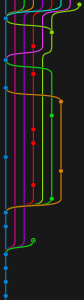
The initial results were very promising. I had multiple agents building features at the same time, and each agent was spending enough time building the feature that I could give instructions to other agents.
I ended up spending two to three hours and got tens of thousands of lines of code written over that time. Now, while things started out super well, they quickly took a negative turn. I had to spend another two hours just merging all the code together.
Even though the features were disjoint, they still touched a lot of shared components. The query parser, the planner, the executor, and handling those merge conflicts just became a huge pain, and I had to do them all one at a time.
On day two of multi-agent, I decided to change my approach. Instead of having agents go off and build complete features and then merge their code in, I had agents work on small slices of the features that would pass tests. Every slice, they would commit their work and then merge back into the main branch. By doing things this way, I guaranteed that there was minimal drift between the code that each agent was working on and minimal effort was needed to actually merge the code together. This actually worked super well. Over time I eventually worked my way up to 17 different coding agents before maxing out the CPU on my computer.
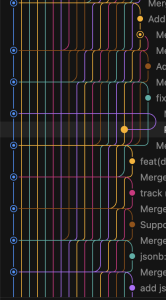
Trusting the agents: One other change I made was I was no longer reading most of the code. You might think this is crazy, but I’ve done this before.
I was previously the CEO of a 120-person company at Freshpaint. And while I wanted to read the code all the time, I wasn’t able to. My job was to set guardrails for the team and make sure I had the visibility I need to understand when things go wrong and why they go wrong. Working with a team of agents is very similar. It’s way more about figuring out how to maximize your leverage and deciding on what to focus on, as opposed to trying to focus on everything.
I’ve been working on getting good sense of what features agents will be able to knock out in one shot and what features agents will struggle with. If it’s a feature that I know an agent will do well, then I’ll just have the agent knock it out. When it’s one that an agent will struggle with, I’ll go to founder mode and really dig in and make sure that the agent does things right.
Of course, a lot of dumb code makes its way through, and that’s okay. Given how early pgrust is, it’s way more about getting something that works than writing the best possible code. It’s faster to get to good state by trusting the agent and fixing things when they go wrong.
With this approach, even though I’ve been working on a large number of tiny features, normally the type of thing AI is not good at, my velocity hasn’t slowed down.
What I’d Like to Build Next
Now that I’m two weeks into pgrust, I think there’s something real here. My road map currently looks like the following:
Full Postgres compatibility. Priority number one is getting the regression suite to pass. I want to go from one third of the tests we are passing to as close to 100 as I can get.
Stability. Once I get the regression suite to pass, I think I’ll need to do a lot of bug bashing. I want to get pgrust into a production-ready state where people can actually trust it as a database.
The things I wish Postgres had: this is the longer-term goal. A number of Postgres’ design decisions date back 40 years. We’ve learned a lot about databases over the last 40 years, and I think there’s opportunity to build something that improves upon what Postgres has.
If you want to follow along:
- GitHub
- Discord
- Mailing list – I’ll send out weekly updates on how pgrust is progressing
- pgrust.com